Start with the source.
Capture the request, relevant documents, audience, and intended outcome. Keep the original material available for checking.
The TIM workspace
Your customer records, tasks, documents, and team conversations belong with the work. TIM builds a workspace around that idea, then adds the AI workflows your business actually needs.
The product, in practice
A workspace shaped around your business. See the work, keep the context, and know who owns the next step.
YOUR OPERATING PICTURE
The request, supporting notes, and prepared reply are together for your review.
Review prepared work, spot missing details, and keep the next action connected to its source.
Representative workspace views using fictional data. Views and connections are configured for each engagement.
A look inside the software
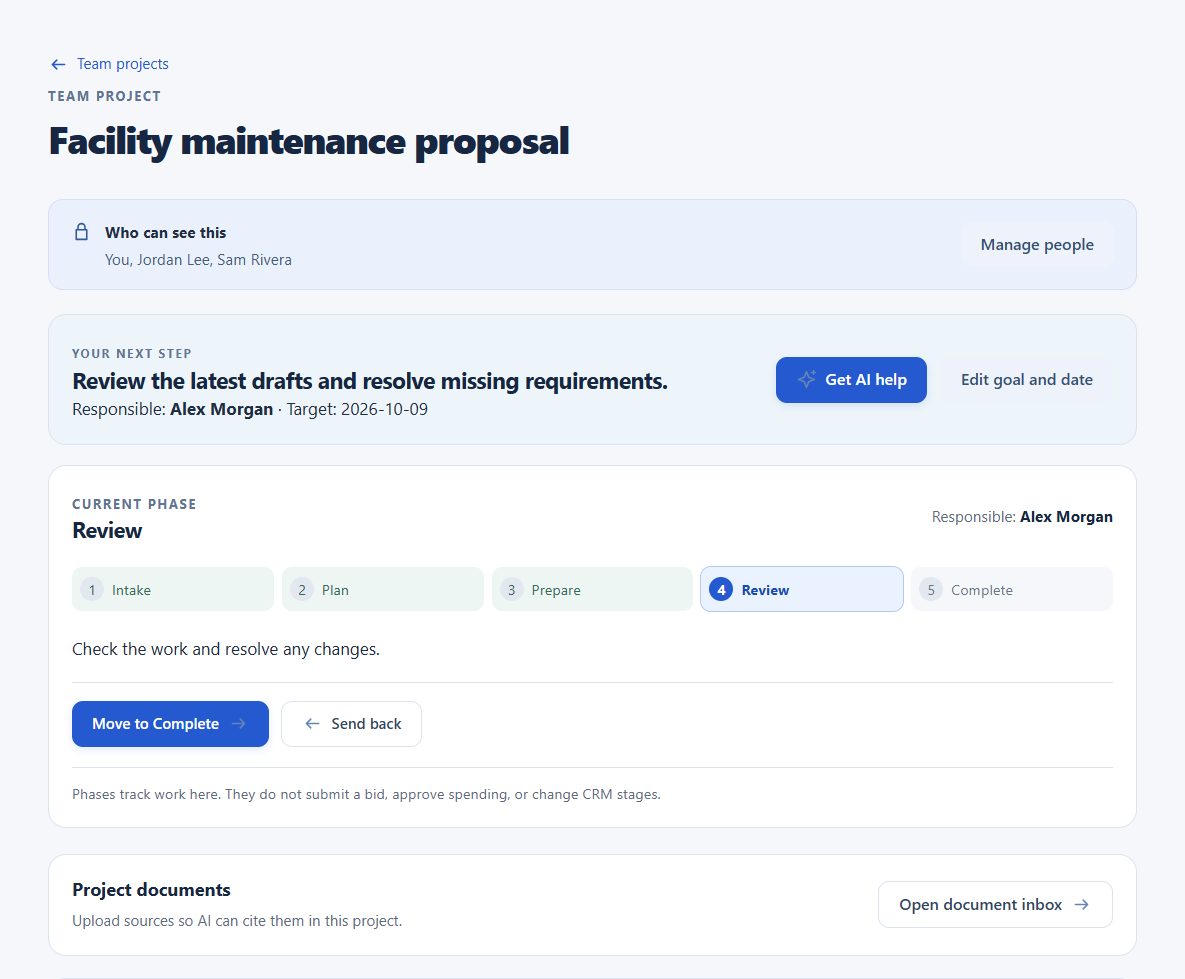
These captures show the current project workspace with demonstration records. The interface is real; the people and project content are fictional.
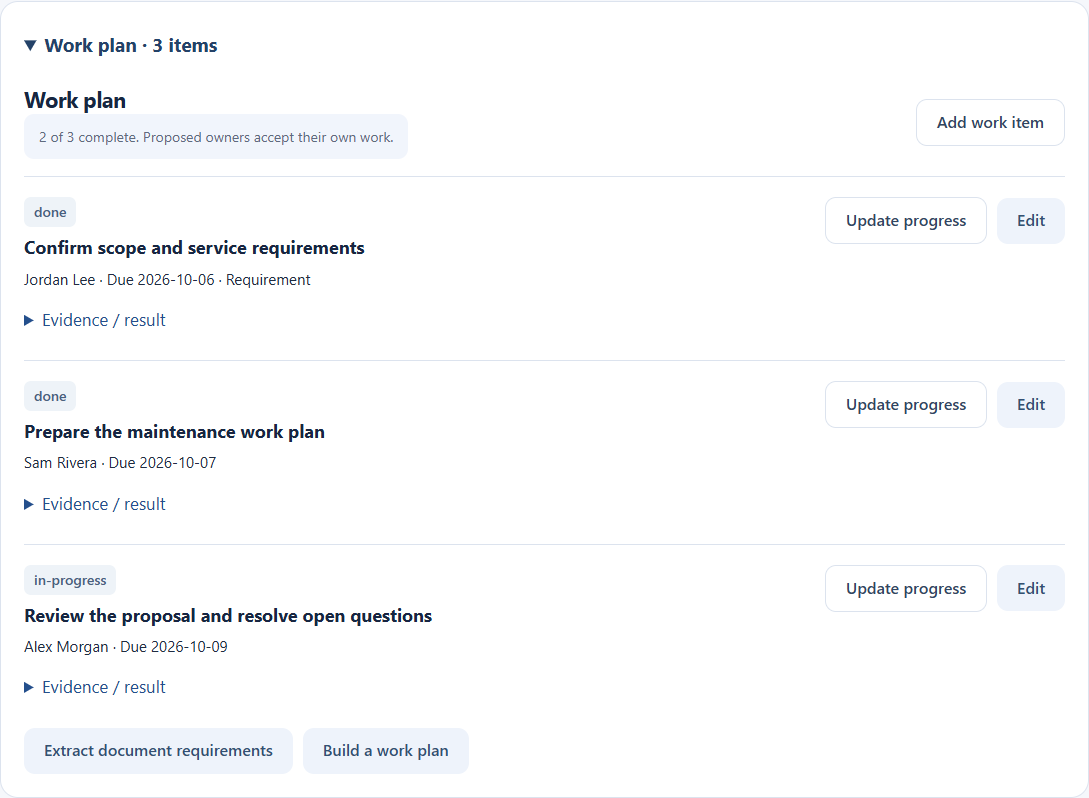
Tasks carry a responsible person, status, due date, and evidence of the result.
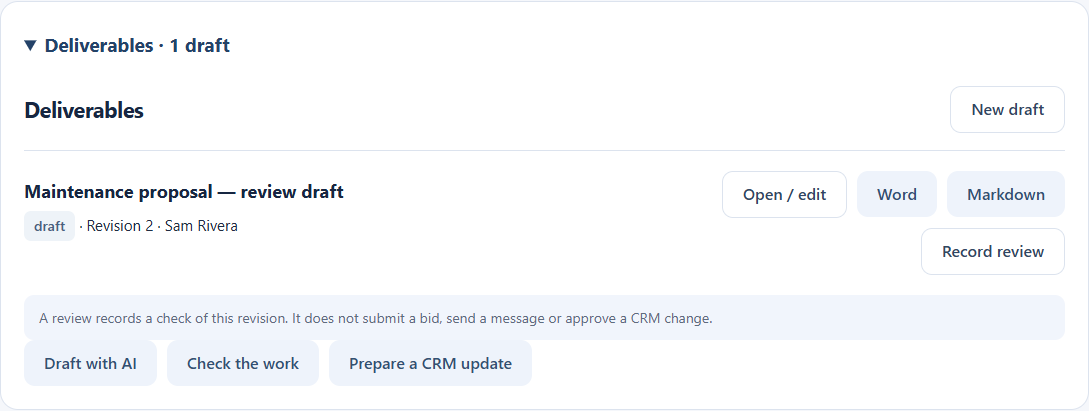
Inspect the draft, request changes, and export a supported document when it is ready.
Captured from an isolated demonstration of the current application. No client records are shown. The example draft was prepared for this demonstration; it is not a claim of an AI-generated result.
Inside a project
Follow an illustrative facilities request through a workspace pattern already used for source-linked project work.
Owner: Jordan · Next step: confirm the draft scope
The original requirements stay attached to the project.
Inspect the equipment identified in the site notes. Document current conditions and prepare the service recommendations.
Capture the request, relevant documents, audience, and intended outcome. Keep the original material available for checking.
Request a summary, task proposal, or working draft. The result remains editable, with questions surfaced for the team.
An assigned person checks the draft and missing details. In supported project workflows, review is tied to the document revision being approved.
Keep the approved output with the project, export supported documents, and track the follow-up task. The next person gets context with the handoff.
Representative project view, with fictional content. Source extraction, document export, and review features depend on the workflow configured for your business.
More than the dashboard
Views give you visibility. The records, conversations, and workflow rules underneath make that visibility useful.
Keep contacts, opportunities, stages, working notes, source files, and the next action in the same record. Review the facts before deciding what to pursue.
Direct messages, groups, channels, and shared files keep people connected. Bring in AI help explicitly when you need it. Human audio, video, and screen sharing are available in supported workspace configurations.
Give a task an owner and status. Show what is ready, what is in progress, and what is waiting on a detail or decision.
Preserve useful files, business notes, and decision history. AI workflows use the approved context relevant to their task; source references make the output easier to check.
Ask AI to research, summarize a source, propose a task, or prepare an editable draft. Your team reviews the result in context. Each configured workflow has agreed inputs, outputs, tool access, and review points.
TIM maintains agreed workflows and connections, reviews problems, tunes the setup, and documents changes. The support scope is part of your proposal.
The workspace brings together customer records, projects, tasks, and team conversations. Connected AI workflows are scoped, configured, and validated for your business. We confirm supported tools, access, and review requirements during setup.
Mission Control
Prepared work and its source material are visible for the reviewer.
Missing details and blocked tasks surface as questions with context.
Approval rules name the person responsible for pricing, commitments, and sensitive actions.
Start with one thing
Bring us one recurring task. We’ll help define a useful first workflow, the review points, and a scope you can understand.
Let’s talk about your businessYour business knowledge.
Our systems and support.
A better way to work.